
Popular topics
Newest Knowledge Base Articles
Q&A: La législation française sur la facturation électronique : activer la facturation électronique pour les clients B2B en France.
La nouvelle législation Qu’est-ce qui change au 1er septembre 2026 ? Conformément à la législation française sur la facturation électronique, toutes les entreprises françaises devront être en mesure de recevoir les…
Guide for two factor authentication (2FA)
Two-factor authentication (2FA) adds a second verification step to the driver portal login. After entering a username and password, the customer receives a 6-digit code to their registered email address. Entering the…
Step‑by‑Step Instructions for Equipping Your Chargers with a Payment Terminal
1. Contact Your CSM Please reach out to your Customer Success Manager (CSM), who will initiate the process by creating a formal request. To start, please provide: Charger details: manufacturer, model, and…
Announcements
Our old Laadpaal app is sunsetting on Tuesday 1 September 2026
We first announced the retirement of the Laadpaal app to our Partners in 2024 and introduced the Easy Charging Quality (ECQ) app as its successor. Since then, we have been…
Changes to Last Mile Solutions’ invoicing and payout frequency
As of September 2026, we will align our invoicing schedule more closely with common market practices, existing and upcoming e-invoicing regulations, and eventually improve payment flows for all parties. What is…
New direct debit service provider for Last Mile Solutions
Last Mile Solutions’ direct debit service provider will be gradually changing. Going forward, our direct debits will be processed by Twikey and EPBF Services, instead of ABN AMRO. As a…
Release Notes November 2023
Introducing New QR Codes: Enhancements, Benefits, and Transition Process
Q&A: La législation française sur la facturation électronique : activer la facturation électronique pour les clients B2B en France.
La nouvelle législation Qu’est-ce qui change au 1er septembre 2026 ? Conformément à la législation française…
Commonly asked questions
- General
- Can I log in as another system user, if I am a system user myself?
Unlike logging in as your customer, you are not able to log in as another system user.
- How many System User accounts can be created?
There is no limit on how many system user accounts you can create.
- Can we use our own Terms & Conditions / End-User Agreement if LMS does the Billing & Collections?
Yes, we can add an extra link to your own terms and conditions on your EVC-net landing page. However, the End-user Agreement of LMS is shown on your landing page by default.
- Which Terms & Conditions / End-User Agreement applies?
If LMS does the billing & collection, then the LMS End-user agreement is used.
If you (the Provider) do the billing & collection, you can use your own End-user agreement.
- Where can I see the Terms & Conditions and Privacy Policy?
You can find the links to Terms & Conditions and Privacy Policy on your EVC-net landing page: [provider].evc-net.com, or in the ECQ App.
- What can I do if I need assistance at a charging location?
Our local customer service are displayed at all charging stations. For trouble charging or any other support request simply call the provided number to receive immediate assistance.
If you want information about the price of charging on a specific charge point, always contact the eMSP that you or the end-user are using. Only they can determine the actual price that somebody will be paying for the charging session.
- Customers
- Can I bulk import a list of customers?
Yes, it is possible to import your customers in bulk. Please, fill in the “Customer bulk import template” or the “Employee bulk import template” and send it to support@lastmilesolutions.com with the request.
- Can we add another field in the customer registration form on our platform landing page?
Currently, this is not possible. The registration form for Private users and Companies is standard for all EVC-net users/
- Can I use the same email address to create several customer accounts?
No, email address is the unique identifier on EVC-net platform. An email address can be used only for one account. If one user needs several accounts, we suggest using different email addresses.
- How can employees register on the platform?
Currently, employees are not able to register on the platform. We recommend your company customers to create employee accounts.
- Does the company admin need to have an employee account?
If the company admin only needs to manage the company account, then they do not need an employee account.
If the company admin receives their own charge card or home reimbursement, they also need an employee account.
- What notifications customers receive if “Receive Notifications” is ticked?
When a customer is charging on one of the stations on our platform, they can choose to receive a text message when charging has been completed.
When you tick “Receive Notifications”, you can set the time when customers receive these text messages.
- How will the customer be reimbursed if they did not fill in their bank details?
Without bank details filled in, we are not able to reimburse your customer, who has home reimbursement set up. Make sure your customers and employees of your customers fill in their banking details.
- Charge Groups
- What is a Charge Group?
Charge groups are a grouping feature for charge points. The charge group is the place where you set the tariff structure and define and manage who is allowed to charge.
Settings in charge group are applied to all charge points attached to it automatically.
- What is “Social Charging”?
Social Charging is the social network for EV drivers to interact with each other. E.g., in order to free up a charge point that is occupied but done charging or to start a queue for a certain charge point.
When enabled, transactions on the charge points in this charge group can be controlled by Social Charging.
Social Charging is currently only available in The Netherlands.
- Charge Points
- What happens when I publish the ‘Location’ of a charge point?
When you publish the Location of your charge point, the charge point will appear on 3rd party apps.
As soon as the location is published once, it cannot be deleted from 3rd party apps, even if you untick the publish button.
- Why is my Charge Point not visible on 3rd party apps?
In order for your charge point to be published on 3rd party apps, you need to Publish the Location of your charge point.
Keep in mind, as soon as the location is published once, it cannot be deleted from 3rd party apps.
Last Mile Solutions is not responsible for the accuracy of the information published on 3rd party apps.
- Why is my charge point not active?
There can be several reasons why your charge point might not be active or online after initial setup.
What you can do?
- Check if the hardware settings of your charge point were correctly configured
- Based on the type of connection (SIM, LAN, WLAN) check the APN and Endpoint configuration.
- Check if the charge point was correctly activated in EVC-net
- If all above are set up correctly, try reaching out to your manufacturer to see if there is an issue with the charge point or configuration.
Is your charge point still not active, even though you set it up correctly? Please reach out to support@lastmilesolutions.com and describe your issue in detail, including the chargepointID.
- Check if the hardware settings of your charge point were correctly configured
- Can I create a custom ChargepointID?
Yes, when you request the charge point to be imported to the platform. However, it is not recommended. Chargepoint IDs need to be unique, therefore, there is a chance the custom chargepoint ID you create is already in use.
Once the charge point is imported to the platform, the chargepointID cannot be changed.
- How do I get my charge point certified?
If you do not find your charging station make and model on the list of certified charge points, you can request the certification via filling in the request form.
- What is Charge Station Certification?
Every charging station that has been certified by LMS has been tested with our backend and approved by our connectivity department. This ensures that the stations are working smoothly on our platform.
- Charge Cards
- How can I order charge cards or key fobs from LMS?
To order charge cards from LMS, please fill out the order form and send it to orders@lastmilesolutions.com, including the branding materials. The order fulfillment can take between 6-8 weeks.
Please keep in mind you will be charged shipping costs:
– Benelux; €35
– Europe: €75 - Can I order charge cards or key fobs from an external party?
Yes you can, however there are certain requirements that need to be met. Our Charge Card standard is MiFARE Classik 1k 7-byte uID (unique ID), which means that the internal RFID ‘ID’ has at least 14 digits. Less than this is not acceptable, because it is not guaranteed anymore that the ID is unique.
- How can I top up the “Wallet”?
The wallet can be topped up by Providers via EVC-net, or Private users via Laadpaal app (soon to be discontinued). Topping up wallet via the ECQ app is not possible.
- Does a “Wallet” have an expiration date?
No, the credit in the wallet does not have an expiration date.
- Where can the customer see their “Wallet” balance?
A customer can view their current balance by logging in to EVC-net or entering their card number via the Laadpaal smartphone app in the “Activate or top up your card” function.
This is also the place where the customer can top up the balance and see the current balance
- Can a customer refund their “Wallet” credit?
A customer cannot refund a charging credit, when it has been added, the customer cannot recover it.
- How can an end-customer switch between accounts (multiple cards)?
The end-customer needs to have a unique username for each account; using the same email address is possible. To switch between accounts, the end-customer needs to log out and log in with the correct username.
- Direct payment service
- I’m CPO and MSP, what are my options for offering direct payment?
If you’re Pure CPO, you can offer New Direct payment service. If you’re both CPO and MSP, you can offer the Direct payment service or Whitelable app via an intermediate screen where the EV-driver can choose.
- Can I apply my provider branding guidelines to this new service?
Yes, the same branding guidelines for the ECQ app are applied to the direct payment service: display your logo and apply your brand colors to buttons. Further Look&Feel customization is not possible.
- Whitelable apps
- What’s the story behind ‘Easy Charging Quality’ brand, a.k.a ECQ?
The brand expresses our ambition to establish an industry-standard, reliable, and quality charging experience for EV drivers. For eMSP partners, the brand positions as a neutral vehicle that complements the eMSP brand.
- What’s the key differences between the In-app whitelabel app and Standalone Whitelabel app?
In a nutshell, the Standalone Whitelabel app offers a premium eMSP brand experience thanks to an independent app store listing and an undiluted custom-branded onboarding experience. There will be no visible association with ECQ in terms of user experience. Whereas, In-app Whitelabel app users, must take extra provider identification steps, which are easy and streamlined. The strength of both apps is sharing common feature sets, which are regularly updated based on customer demands and market trends.
- Is there a performance difference between the two apps in terms of response rate and features?
No. Besides brand experience, there are no functional, performance, or feature-oriented differences.
- Which currencies are supported?
Currently the platform supports Euro, US Dollar, Swiss-franc, Polish Zloty, Swedish Krone and Norwegian Krone. More currencies such as the British pound sterling will be available on the platform.
- Can I add my own features or modules to my app?
No, not directly. We are keen to receive your requests and feedback to shape our product roadmap. In principle, frequently requested features across multiple MSP’s are prioritized.
- Can I create a custom app icon for the In-app Whitelabel app?
No, it’s not possible. Easy Charge Quality App is the app name and the app icon that the user will download.
- Will my customers ever see the brand of other eMSP competitors in In-app Whitelable app?
No, logged-in users of one eMSP will never see other eMSP brands within the ECQ app.
- Can an EV driver become a user for multiple eMSPs on Last Mile Solutions?
Yes, technically it’s possible, although we, Last Mile Solutions, never promote such cases. We notice that there is a small portion of private users who sign up for multiple eMSPs.
- If I choose the Standalone Whitelable app, how much customization is possible?
There is a large customization possibility in terms of app store listing. You will be the de-factor owner of two mobile apps (iOS and Android) and will be owning the app store marketing content such as app name, subtitle, audio/ visual marketing assets. All of them need to be prepared and keep up to date in order to deliver the best customer experience possible.
In terms of customer experience within the app, you can customize the splash screen (the screen shown when the app is open), the logo, and first and secondary colors. Please be aware that we do not support advanced look & feel customizations, such as font style and UI layouts.
- Can I, as an eMSP become an app publisher of the Standalone Whitelable app?
No, Last Mile Solutions is the publisher of both apps on Apple Appstore and Google Play Store. We will technically manage the apps on behalf of you, ensuring that your apps are running smoothly and up to date.
- Invoicing
- When is VAT reverse charged?
The reverse charge mechanism can be mandatory for specific goods or specific transactions like international trade. For EV-charging, the reverse charge mechanism is based on article 195 of the EU VAT Directive. For business customers, VAT will only be reverse charged if there is a valid VAT number in the country where the charging session has taken place. For example: if your company only has a valid VAT number in Belgium, only Belgium charging sessions will be eligible for reverse charge VAT. For charging sessions outside Belgium, local VAT will be invoiced.
- What does a self-bill with reverse charge VAT look like?
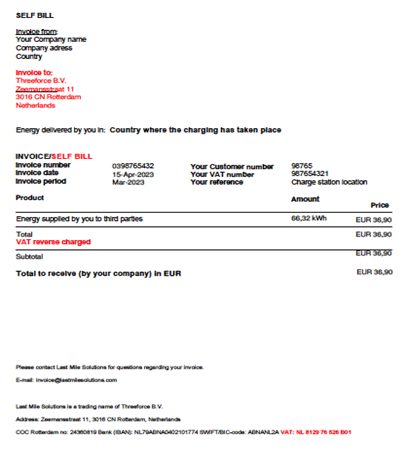
When you have supplied energy to third parties, it is possible you will receive the payment for that transaction from Threeforce B.V. through a so-called self-bill. A self-bill is a regular sales invoice for your company, but it is prepared by Threeforce B.V.
On a self-bill, your company reverse charges VAT to Threeforce B.V. and our Dutch VAT number which you can find in the invoice footer.
- What if my company has multiple VAT registrations?
If your company has more than one VAT number in various EU countries, you will be able to register each of these numbers in EVC net from May 25th. For charging sessions that are being done in countries where you registered a valid VAT number, VAT will also be reverse charged. In order to enable the “Multi-VAT” option, please login to your account and go to your invoice details. Click on the “New VAT number” button to add another VAT number.
On the following screen, you will see this notice:

The notice explains that the multi-VAT option is only available if your company has more than one VAT number in the EU besides your main VAT number (registered in your resident company name). If you want to register more companies, you will need to create another account.
- What does an invoice with reverse charge VAT look like?
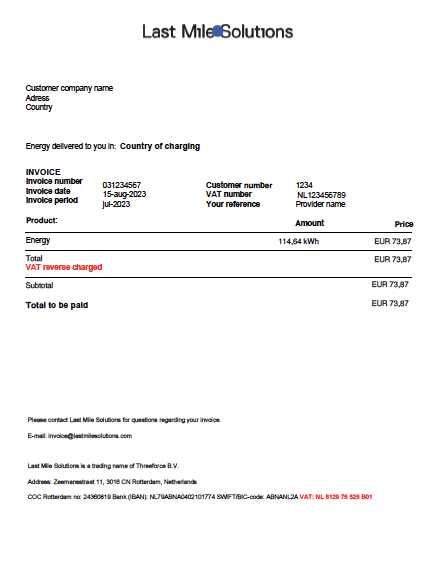
The invoice will not mention VAT, just the words “VAT reverse charge” (or similar wording when you receive an invoice in a different language). The invoice will always mention Threeforce B.V. and our Dutch VAT number.
- Can you use our companies sequential invoice numbering on the self-bill?
A self-bill is a sales invoice for your company but because it is prepared by Last Mile Solutions (Threeforce BV), it will not have a sequential invoice number that matches your administrative set up. Unfortunately, we are not able to generate an invoice number in accordance with your company’s numbering. We advise you to either prepare a new sales invoice in your system with the Last Mile Solutions invoice number as a reference- or order number or create a new invoice series for the self-bills.
- How do I report an invoice/self-bill with VAT reverse charge in my administration and tax return?
Every EU country has its own VAT form format so you should check with your local advisor to see where to book and report a sales invoice with reverse charge VAT (when we send you a self-bill) or a purchase invoice with reverse charge VAT.
- What happens if I do have a valid VAT number, but I did not register this correctly on the platform?
Because of the risk of fraud and EU regulations, unfortunately we cannot retro-actively reverse charge VAT. Please make sure you provide the correct details and we will apply reverse charge for future invoices. For invoices with local VAT, we refer you to our FAQ under 4 to see how you can request a VAT refund. From the moment the correct VAT details are provided, VAT will be reverse charged. If this is done halfway through an invoice period, you will receive two invoices for that period: one with reverse charge VAT and one without.
- What happens if I do not have a valid VAT number?
If you do not have a valid VAT number in the country where you charge the vehicle or if the VAT number you provided is not valid or does not match the company name, VAT cannot be reverse charged. The invoice will mention the VAT of the country where the charging session has taken place. Within the EU, you can still claim this VAT back, but you have to go through a separate procedure, you can read more about how to do this on https://europa.eu/youreurope/business/taxation/vat/vat-refunds/index_en.htm
- What do I have to do to get VAT reverse charged?
VAT can only be reverse charged when you provide us with a valid VAT number. Your company details need to exactly match the VAT number that was issued. This can be checked through the European VIES registration system: https://europa.eu/youreurope/business/taxation/vat/check-vat-number-vies/index_en.htm
How to edit or add a new VAT number
- Open the company account
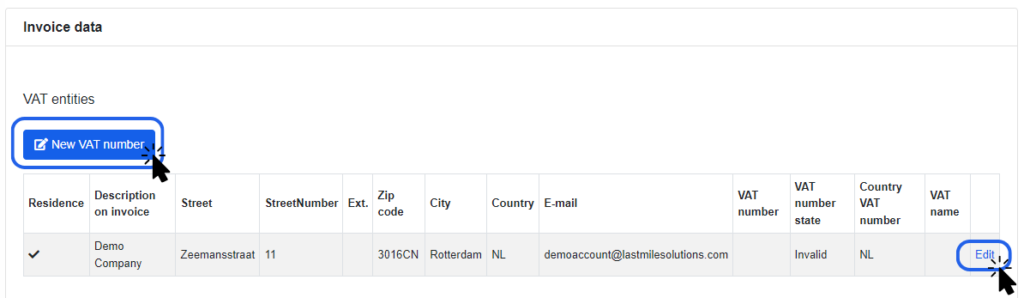
- Scroll down to Invoice Data > VAT Entities
- Click New VAT Number or Edit
- Fill in the requested data – keep in mind it will be used for invoicing purposes
- Description on invoice* – fill in the company name the same way as it is registered in VIES
- Address – please fill in the correct address for the company seat
- Email – fill in the email address for invoicing
- VAT Number – please fill in a valid VAT number (see VIES)
- Country VAT Number – Select the country this VAT number is registered in
- Fill in the requested data – keep in mind it will be used for invoicing purposes
- Save
Make sure the Description on invoice (company name) and VAT Number are the same as in the EU directory VIES. EVC-net automatically checks the VAT number and company name against VIES and validates it. Once you save the VAT Entity, you will see if the VAT number was validated, or not. If not, please revise the VAT number or company name.
You can add multiple VAT numbers. Be aware, you are only allowed to add multiple VAT numbers of this single entity, not of several entities with different seats.
- Where can I find my invoices?
Log in to your platform and click on Payments > Invoices. Here, you can sort on type of invoice and see all invoices issued.
- Products, Tariffs & Margins
- What is a Blocking Fee?
A blocking fee is a fee that applies after a certain amount of time has passed, no matter if the car is fully charged or still charging. For example, always 0,10€ / minute after 120 minutes.
Blocking fee is an alternative for idle fee, as it complies with price transparency.
- What is an Idle Fee?
An idle fee is a fee (usually per minute) that is applied when a car is fully charged. However, due to price transparency regulations it is not allowed to use idle fees because the final price for charging is hard to predict.
- What is the difference between Idle Fee and Blocking Fee?
An idle fee is applied as soon as the car is fully charged. In contrast, blocking fee is applied after a certain amount of minutes from the moment an EV starts charging.
An idle fee is not in use due to non-compliance with price transparency. Instead, blocking fee is used, as it allows us to predict the final price of charging and thus complies with price transparency.
- What happens when I change the tariff?
The CPO on the Last Mile Solutions network can change the tariff applied to each of its charging points. The change will be available immediately in EVC-net and will also be charged to accordingly. This is done by changing the tariff from one tariff to another from the predefined list. For instance: If you want to change the tariff on your charging point from 0.33 to 0.35 cent, the tariffid will be switched from K33 to K35.
This change is then communicated via our connections towards all the roaming partners and hubs.
The eMSPs are also requested to pull the pricing information per EVSE ID from the live-data stream on a regular basis to receive the correct tariff per charging point. In some cases, the tariffs are shared manually and each eMPS has their own internal procedure to set up the CPO tariff in their system. - Why can I not create any tariff I want?
The reasons why as a CPO on the Last Mile Solutions network you cannot set up any tariff you desire is coming from the fact that we have to communicate the correct tariff to all our roaming partners (eMSPs) in the correct timing. Some of these contracts state that we need to notify new tariffs at least 30 days in advance. Therefore we have chosen to create a long list with many common tariffs and communicate these in advance to all our partners. These tariffs will never change, we will only add new tariffs in due course.
By using any of the predefined tariffs, you can change the tariff on the charge point without having to adhere to this 30 day notification period.
- My tariff is not on the CPO Tariff List. What now?
The tariff list contains over 700 of the most used tariffs. Please check if any tariff is very close to the tariff you had in mind and choose that one.
If you however have a tariff that is needed for a tender or a specific use case, and it is used for a large portion of your charge points (over 300 EVSEs), we can create a new custom tariff.
Please be aware that we need to communicate this to our roaming partners and that a 30 day notification time does apply before you can start using it.
- If I change the tariff, how long does it take to process the change at EVC-net?
The tariff change happens automatically. From the moment you publish a new tariff in EVC-net, you will see that the charge point will be updated with the new tariff immediately.
However, the communication between the new tariff to other eMSPs may happen manually, via hubs or P2P connections and that may take some time to be fully processed.
- If I change the tariff, how long does it take to be shared with technical hubs/eMSP roaming partners?
The tariff change happens automatically in our systems. From the moment you publish a new tariff in EVC-net, this change will be either communicated directly via P2P connections, be updated in our system and eMSPs will pull the data on a regular basis to make sure they can show the correct prices in their apps.
- What happens if a provider changes a tariff, and the eMSP does not show the latest update?
For example, a charge point that had a tariff price of 0.50/ kWh and now the same charge point has a tariff price of 0.55/kWh. If the driver still sees in the app the tariff price of 0.50/kWh, who is paying the extra 0.05 kWh? Does the EV driver get invoiced the 0.55 kWh or the 0.50/ kWh? What how much does the provider will receive?
This typically depends on the technical route between Last Mile Solutions and the roaming partner and the way the eMSP handles this with their customers. If the change has happened in our system, the CDRs created for any session after the change will be calculated with the new tariff. We expect our eMSP to also pay the CDR as was calculated.
The eMSP is responsible for showing the correct price and therefore the difference will be paid by the eMSP. The end user is responsible to check the price always before charging somewhere as prices can change all the time.
However if we see that there are systemic or technical errors between us and the roaming partner, it might be that the eMSP will contest the CDR. Last Mile Solutions will credit the difference only if we see that there were technical issues that could have been prohibited. - Can I support an idle / parking / overstaying fee?
It depends what you want to achieve with such a fee and how it can be used. Mostly you want drivers to leave the charging spot when they are full. The problem however is that there is no real standard that defines how to deal with such tariffs. Also this is hindered by the fact that most parties do not share the moment when the car is fully charged. This then results in CDRs that can not be recalculated and checked by the eMSP. Also the end user has no clue what he will pay upfront as there are many factors like smart charing, battery management etc. that are unknown to the end user that can influence the charging time. This make a tariff based on end of charge non-transparent to the end user. This is the reason why we do not want to offer such a tariff.
The best standard to use a tariff like this is to define a minute fee that will start from a certain moment after the start of the session. In this way both end user and eMSP can calculate what they are going to pay. You could state that after 360 minutes a fee of 0.05 per minute will be applied. An end-user then knows he has to come back in 6 hours if they want to avoid this fee.
- Direct payment service
- I’m CPO and MSP, what are my options for offering direct payment?
If you’re Pure CPO, you can offer New Direct payment service. If you’re both CPO and MSP, you can offer the Direct payment service or Whitelable app via an intermediate screen where the EV-driver can choose.
- Can I apply my provider branding guidelines to this new service?
Yes, the same branding guidelines for the ECQ app are applied to the direct payment service: display your logo and apply your brand colors to buttons. Further Look&Feel customization is not possible.
- Whitelable apps
- What’s the story behind ‘Easy Charging Quality’ brand, a.k.a ECQ?
The brand expresses our ambition to establish an industry-standard, reliable, and quality charging experience for EV drivers. For eMSP partners, the brand positions as a neutral vehicle that complements the eMSP brand.
- What’s the key differences between the In-app whitelabel app and Standalone Whitelabel app?
In a nutshell, the Standalone Whitelabel app offers a premium eMSP brand experience thanks to an independent app store listing and an undiluted custom-branded onboarding experience. There will be no visible association with ECQ in terms of user experience. Whereas, In-app Whitelabel app users, must take extra provider identification steps, which are easy and streamlined. The strength of both apps is sharing common feature sets, which are regularly updated based on customer demands and market trends.
- Is there a performance difference between the two apps in terms of response rate and features?
No. Besides brand experience, there are no functional, performance, or feature-oriented differences.
- Which currencies are supported?
Currently the platform supports Euro, US Dollar, Swiss-franc, Polish Zloty, Swedish Krone and Norwegian Krone. More currencies such as the British pound sterling will be available on the platform.
- Can I add my own features or modules to my app?
No, not directly. We are keen to receive your requests and feedback to shape our product roadmap. In principle, frequently requested features across multiple MSP’s are prioritized.
- Can I create a custom app icon for the In-app Whitelabel app?
No, it’s not possible. Easy Charge Quality App is the app name and the app icon that the user will download.
- Will my customers ever see the brand of other eMSP competitors in In-app Whitelable app?
No, logged-in users of one eMSP will never see other eMSP brands within the ECQ app.
- Can an EV driver become a user for multiple eMSPs on Last Mile Solutions?
Yes, technically it’s possible, although we, Last Mile Solutions, never promote such cases. We notice that there is a small portion of private users who sign up for multiple eMSPs.
- If I choose the Standalone Whitelable app, how much customization is possible?
There is a large customization possibility in terms of app store listing. You will be the de-factor owner of two mobile apps (iOS and Android) and will be owning the app store marketing content such as app name, subtitle, audio/ visual marketing assets. All of them need to be prepared and keep up to date in order to deliver the best customer experience possible.
In terms of customer experience within the app, you can customize the splash screen (the screen shown when the app is open), the logo, and first and secondary colors. Please be aware that we do not support advanced look & feel customizations, such as font style and UI layouts.
- Can I, as an eMSP become an app publisher of the Standalone Whitelable app?
No, Last Mile Solutions is the publisher of both apps on Apple Appstore and Google Play Store. We will technically manage the apps on behalf of you, ensuring that your apps are running smoothly and up to date.
- General
- Can I log in as another system user, if I am a system user myself?
Unlike logging in as your customer, you are not able to log in as another system user.
- How many System User accounts can be created?
There is no limit on how many system user accounts you can create.
- Can we use our own Terms & Conditions / End-User Agreement if LMS does the Billing & Collections?
Yes, we can add an extra link to your own terms and conditions on your EVC-net landing page. However, the End-user Agreement of LMS is shown on your landing page by default.
- Which Terms & Conditions / End-User Agreement applies?
If LMS does the billing & collection, then the LMS End-user agreement is used.
If you (the Provider) do the billing & collection, you can use your own End-user agreement.
- Where can I see the Terms & Conditions and Privacy Policy?
You can find the links to Terms & Conditions and Privacy Policy on your EVC-net landing page: [provider].evc-net.com, or in the ECQ App.
- What can I do if I need assistance at a charging location?
Our local customer service are displayed at all charging stations. For trouble charging or any other support request simply call the provided number to receive immediate assistance.
If you want information about the price of charging on a specific charge point, always contact the eMSP that you or the end-user are using. Only they can determine the actual price that somebody will be paying for the charging session.
- Invoicing
- When is VAT reverse charged?
The reverse charge mechanism can be mandatory for specific goods or specific transactions like international trade. For EV-charging, the reverse charge mechanism is based on article 195 of the EU VAT Directive. For business customers, VAT will only be reverse charged if there is a valid VAT number in the country where the charging session has taken place. For example: if your company only has a valid VAT number in Belgium, only Belgium charging sessions will be eligible for reverse charge VAT. For charging sessions outside Belgium, local VAT will be invoiced.
- What does a self-bill with reverse charge VAT look like?
When you have supplied energy to third parties, it is possible you will receive the payment for that transaction from Threeforce B.V. through a so-called self-bill. A self-bill is a regular sales invoice for your company, but it is prepared by Threeforce B.V.
On a self-bill, your company reverse charges VAT to Threeforce B.V. and our Dutch VAT number which you can find in the invoice footer.
- What if my company has multiple VAT registrations?
If your company has more than one VAT number in various EU countries, you will be able to register each of these numbers in EVC net from May 25th. For charging sessions that are being done in countries where you registered a valid VAT number, VAT will also be reverse charged. In order to enable the “Multi-VAT” option, please login to your account and go to your invoice details. Click on the “New VAT number” button to add another VAT number.
On the following screen, you will see this notice:
The notice explains that the multi-VAT option is only available if your company has more than one VAT number in the EU besides your main VAT number (registered in your resident company name). If you want to register more companies, you will need to create another account.
- What does an invoice with reverse charge VAT look like?
The invoice will not mention VAT, just the words “VAT reverse charge” (or similar wording when you receive an invoice in a different language). The invoice will always mention Threeforce B.V. and our Dutch VAT number.
- Can you use our companies sequential invoice numbering on the self-bill?
A self-bill is a sales invoice for your company but because it is prepared by Last Mile Solutions (Threeforce BV), it will not have a sequential invoice number that matches your administrative set up. Unfortunately, we are not able to generate an invoice number in accordance with your company’s numbering. We advise you to either prepare a new sales invoice in your system with the Last Mile Solutions invoice number as a reference- or order number or create a new invoice series for the self-bills.
- How do I report an invoice/self-bill with VAT reverse charge in my administration and tax return?
Every EU country has its own VAT form format so you should check with your local advisor to see where to book and report a sales invoice with reverse charge VAT (when we send you a self-bill) or a purchase invoice with reverse charge VAT.
- What happens if I do have a valid VAT number, but I did not register this correctly on the platform?
Because of the risk of fraud and EU regulations, unfortunately we cannot retro-actively reverse charge VAT. Please make sure you provide the correct details and we will apply reverse charge for future invoices. For invoices with local VAT, we refer you to our FAQ under 4 to see how you can request a VAT refund. From the moment the correct VAT details are provided, VAT will be reverse charged. If this is done halfway through an invoice period, you will receive two invoices for that period: one with reverse charge VAT and one without.
- What happens if I do not have a valid VAT number?
If you do not have a valid VAT number in the country where you charge the vehicle or if the VAT number you provided is not valid or does not match the company name, VAT cannot be reverse charged. The invoice will mention the VAT of the country where the charging session has taken place. Within the EU, you can still claim this VAT back, but you have to go through a separate procedure, you can read more about how to do this on https://europa.eu/youreurope/business/taxation/vat/vat-refunds/index_en.htm
- What do I have to do to get VAT reverse charged?
VAT can only be reverse charged when you provide us with a valid VAT number. Your company details need to exactly match the VAT number that was issued. This can be checked through the European VIES registration system: https://europa.eu/youreurope/business/taxation/vat/check-vat-number-vies/index_en.htm
How to edit or add a new VAT number
- Open the company account
- Scroll down to Invoice Data > VAT Entities
- Click New VAT Number or Edit
- Fill in the requested data – keep in mind it will be used for invoicing purposes
- Description on invoice* – fill in the company name the same way as it is registered in VIES
- Address – please fill in the correct address for the company seat
- Email – fill in the email address for invoicing
- VAT Number – please fill in a valid VAT number (see VIES)
- Country VAT Number – Select the country this VAT number is registered in
- Fill in the requested data – keep in mind it will be used for invoicing purposes
- Save
Make sure the Description on invoice (company name) and VAT Number are the same as in the EU directory VIES. EVC-net automatically checks the VAT number and company name against VIES and validates it. Once you save the VAT Entity, you will see if the VAT number was validated, or not. If not, please revise the VAT number or company name.
You can add multiple VAT numbers. Be aware, you are only allowed to add multiple VAT numbers of this single entity, not of several entities with different seats.
- Where can I find my invoices?
Log in to your platform and click on Payments > Invoices. Here, you can sort on type of invoice and see all invoices issued.
- Products, Tariffs & Margins
- What is a Blocking Fee?
A blocking fee is a fee that applies after a certain amount of time has passed, no matter if the car is fully charged or still charging. For example, always 0,10€ / minute after 120 minutes.
Blocking fee is an alternative for idle fee, as it complies with price transparency.
- What is an Idle Fee?
An idle fee is a fee (usually per minute) that is applied when a car is fully charged. However, due to price transparency regulations it is not allowed to use idle fees because the final price for charging is hard to predict.
- What is the difference between Idle Fee and Blocking Fee?
An idle fee is applied as soon as the car is fully charged. In contrast, blocking fee is applied after a certain amount of minutes from the moment an EV starts charging.
An idle fee is not in use due to non-compliance with price transparency. Instead, blocking fee is used, as it allows us to predict the final price of charging and thus complies with price transparency.
- What happens when I change the tariff?
The CPO on the Last Mile Solutions network can change the tariff applied to each of its charging points. The change will be available immediately in EVC-net and will also be charged to accordingly. This is done by changing the tariff from one tariff to another from the predefined list. For instance: If you want to change the tariff on your charging point from 0.33 to 0.35 cent, the tariffid will be switched from K33 to K35.
This change is then communicated via our connections towards all the roaming partners and hubs.
The eMSPs are also requested to pull the pricing information per EVSE ID from the live-data stream on a regular basis to receive the correct tariff per charging point. In some cases, the tariffs are shared manually and each eMPS has their own internal procedure to set up the CPO tariff in their system. - Why can I not create any tariff I want?
The reasons why as a CPO on the Last Mile Solutions network you cannot set up any tariff you desire is coming from the fact that we have to communicate the correct tariff to all our roaming partners (eMSPs) in the correct timing. Some of these contracts state that we need to notify new tariffs at least 30 days in advance. Therefore we have chosen to create a long list with many common tariffs and communicate these in advance to all our partners. These tariffs will never change, we will only add new tariffs in due course.
By using any of the predefined tariffs, you can change the tariff on the charge point without having to adhere to this 30 day notification period.
- My tariff is not on the CPO Tariff List. What now?
The tariff list contains over 700 of the most used tariffs. Please check if any tariff is very close to the tariff you had in mind and choose that one.
If you however have a tariff that is needed for a tender or a specific use case, and it is used for a large portion of your charge points (over 300 EVSEs), we can create a new custom tariff.
Please be aware that we need to communicate this to our roaming partners and that a 30 day notification time does apply before you can start using it.
- If I change the tariff, how long does it take to process the change at EVC-net?
The tariff change happens automatically. From the moment you publish a new tariff in EVC-net, you will see that the charge point will be updated with the new tariff immediately.
However, the communication between the new tariff to other eMSPs may happen manually, via hubs or P2P connections and that may take some time to be fully processed.
- If I change the tariff, how long does it take to be shared with technical hubs/eMSP roaming partners?
The tariff change happens automatically in our systems. From the moment you publish a new tariff in EVC-net, this change will be either communicated directly via P2P connections, be updated in our system and eMSPs will pull the data on a regular basis to make sure they can show the correct prices in their apps.
- What happens if a provider changes a tariff, and the eMSP does not show the latest update?
For example, a charge point that had a tariff price of 0.50/ kWh and now the same charge point has a tariff price of 0.55/kWh. If the driver still sees in the app the tariff price of 0.50/kWh, who is paying the extra 0.05 kWh? Does the EV driver get invoiced the 0.55 kWh or the 0.50/ kWh? What how much does the provider will receive?
This typically depends on the technical route between Last Mile Solutions and the roaming partner and the way the eMSP handles this with their customers. If the change has happened in our system, the CDRs created for any session after the change will be calculated with the new tariff. We expect our eMSP to also pay the CDR as was calculated.
The eMSP is responsible for showing the correct price and therefore the difference will be paid by the eMSP. The end user is responsible to check the price always before charging somewhere as prices can change all the time.
However if we see that there are systemic or technical errors between us and the roaming partner, it might be that the eMSP will contest the CDR. Last Mile Solutions will credit the difference only if we see that there were technical issues that could have been prohibited. - Can I support an idle / parking / overstaying fee?
It depends what you want to achieve with such a fee and how it can be used. Mostly you want drivers to leave the charging spot when they are full. The problem however is that there is no real standard that defines how to deal with such tariffs. Also this is hindered by the fact that most parties do not share the moment when the car is fully charged. This then results in CDRs that can not be recalculated and checked by the eMSP. Also the end user has no clue what he will pay upfront as there are many factors like smart charing, battery management etc. that are unknown to the end user that can influence the charging time. This make a tariff based on end of charge non-transparent to the end user. This is the reason why we do not want to offer such a tariff.
The best standard to use a tariff like this is to define a minute fee that will start from a certain moment after the start of the session. In this way both end user and eMSP can calculate what they are going to pay. You could state that after 360 minutes a fee of 0.05 per minute will be applied. An end-user then knows he has to come back in 6 hours if they want to avoid this fee.
- Customers
- Can I bulk import a list of customers?
Yes, it is possible to import your customers in bulk. Please, fill in the “Customer bulk import template” or the “Employee bulk import template” and send it to support@lastmilesolutions.com with the request.
- Can we add another field in the customer registration form on our platform landing page?
Currently, this is not possible. The registration form for Private users and Companies is standard for all EVC-net users/
- Can I use the same email address to create several customer accounts?
No, email address is the unique identifier on EVC-net platform. An email address can be used only for one account. If one user needs several accounts, we suggest using different email addresses.
- How can employees register on the platform?
Currently, employees are not able to register on the platform. We recommend your company customers to create employee accounts.
- Does the company admin need to have an employee account?
If the company admin only needs to manage the company account, then they do not need an employee account.
If the company admin receives their own charge card or home reimbursement, they also need an employee account.
- What notifications customers receive if “Receive Notifications” is ticked?
When a customer is charging on one of the stations on our platform, they can choose to receive a text message when charging has been completed.
When you tick “Receive Notifications”, you can set the time when customers receive these text messages.
- How will the customer be reimbursed if they did not fill in their bank details?
Without bank details filled in, we are not able to reimburse your customer, who has home reimbursement set up. Make sure your customers and employees of your customers fill in their banking details.
- Charge Groups
- What is a Charge Group?
Charge groups are a grouping feature for charge points. The charge group is the place where you set the tariff structure and define and manage who is allowed to charge.
Settings in charge group are applied to all charge points attached to it automatically.
- What is “Social Charging”?
Social Charging is the social network for EV drivers to interact with each other. E.g., in order to free up a charge point that is occupied but done charging or to start a queue for a certain charge point.
When enabled, transactions on the charge points in this charge group can be controlled by Social Charging.
Social Charging is currently only available in The Netherlands.
- Charge Points
- What happens when I publish the ‘Location’ of a charge point?
When you publish the Location of your charge point, the charge point will appear on 3rd party apps.
As soon as the location is published once, it cannot be deleted from 3rd party apps, even if you untick the publish button.
- Why is my Charge Point not visible on 3rd party apps?
In order for your charge point to be published on 3rd party apps, you need to Publish the Location of your charge point.
Keep in mind, as soon as the location is published once, it cannot be deleted from 3rd party apps.
Last Mile Solutions is not responsible for the accuracy of the information published on 3rd party apps.
- Why is my charge point not active?
There can be several reasons why your charge point might not be active or online after initial setup.
What you can do?
- Check if the hardware settings of your charge point were correctly configured
- Based on the type of connection (SIM, LAN, WLAN) check the APN and Endpoint configuration.
- Check if the charge point was correctly activated in EVC-net
- If all above are set up correctly, try reaching out to your manufacturer to see if there is an issue with the charge point or configuration.
Is your charge point still not active, even though you set it up correctly? Please reach out to support@lastmilesolutions.com and describe your issue in detail, including the chargepointID.
- Check if the hardware settings of your charge point were correctly configured
- Can I create a custom ChargepointID?
Yes, when you request the charge point to be imported to the platform. However, it is not recommended. Chargepoint IDs need to be unique, therefore, there is a chance the custom chargepoint ID you create is already in use.
Once the charge point is imported to the platform, the chargepointID cannot be changed.
- How do I get my charge point certified?
If you do not find your charging station make and model on the list of certified charge points, you can request the certification via filling in the request form.
- What is Charge Station Certification?
Every charging station that has been certified by LMS has been tested with our backend and approved by our connectivity department. This ensures that the stations are working smoothly on our platform.
- Charge Cards
- How can I order charge cards or key fobs from LMS?
To order charge cards from LMS, please fill out the order form and send it to orders@lastmilesolutions.com, including the branding materials. The order fulfillment can take between 6-8 weeks.
Please keep in mind you will be charged shipping costs:
– Benelux; €35
– Europe: €75 - Can I order charge cards or key fobs from an external party?
Yes you can, however there are certain requirements that need to be met. Our Charge Card standard is MiFARE Classik 1k 7-byte uID (unique ID), which means that the internal RFID ‘ID’ has at least 14 digits. Less than this is not acceptable, because it is not guaranteed anymore that the ID is unique.
- How can I top up the “Wallet”?
The wallet can be topped up by Providers via EVC-net, or Private users via Laadpaal app (soon to be discontinued). Topping up wallet via the ECQ app is not possible.
- Does a “Wallet” have an expiration date?
No, the credit in the wallet does not have an expiration date.
- Where can the customer see their “Wallet” balance?
A customer can view their current balance by logging in to EVC-net or entering their card number via the Laadpaal smartphone app in the “Activate or top up your card” function.
This is also the place where the customer can top up the balance and see the current balance
- Can a customer refund their “Wallet” credit?
A customer cannot refund a charging credit, when it has been added, the customer cannot recover it.
- How can an end-customer switch between accounts (multiple cards)?
The end-customer needs to have a unique username for each account; using the same email address is possible. To switch between accounts, the end-customer needs to log out and log in with the correct username.